Construction software should be free, open, and yours.

We are building the whole construction office as native apps that run on your own machine. No seat, no server, no vendor between you and your drawings. One app at a time, in the open, until the office is done.

The Takeoff Beam launch film. Rendered from code and the real app, no screen recording.

21 ms
to open an 859-page, 708 MB drawing set
47 MB
the whole app, native Rust, no browser
0 bytes
sent to a model vendor by default
$0
now, and not just for now

Every number measured on Takeoff Beam. None projected.

Four things the industry got backwards.

  1. 01

    Your drawings are yours.

    They were yours before software existed, and a subscription should not change that. Every Open Construction app runs on your own machine. The files stay where you put them, the model reads them on your disk, and uninstalling us costs you nothing you made.

  2. 02

    Local is the default, not the upgrade.

    The industry sells privacy as an enterprise tier. We think a two-person sub deserves the same guarantee as a public owner. So the apps work offline, need no account, and only reach a cloud model when you flip the switch yourself.

  3. 03

    Free has to be at least as good.

    Free software that is worse is a tax on the people who cannot afford the real thing. Each app here has a named commercial incumbent, and it does not ship until it can stand in for that tool on a real job. The numbers in the film are the bar.

  4. 04

    Build it in the open.

    Takeoff Beam is Apache 2.0 on GitHub, down to the film you are about to watch. Read it, fork it, file the bug. The apps that follow go the same way as they mature, because software a trade relies on should not be able to disappear.

The whole construction office, one app at a time.

Takeoff shipped first because an estimator opens a drawing before anyone else touches a job. The full agentic workspace came with it. The next four follow the paperwork downstream: check the set, read the contract, build the schedule, write the documents.

Two apps you can install this afternoon.

Signed and notarized, free, no account. They update themselves, so this is the last version number you have to read.

Takeoff Beam

Stands in for Bluebeam Revu

Shipped

PDF viewer, markups and quantity takeoff, with an agent that works the sheet.

Open a drawing set, then count, measure and mark it up. Ask the agent to do the same on the sheet in front of you: it sets the scale, counts symbols, measures runs and reads title blocks, and you review everything it adds.

  • Counts, lengths, areas with cutouts, volumes, angles. Scale presets, calibration, snapping, Follow Line.
  • Text, callouts, clouds, stamps, and a Markups List with custom columns and CSV export.
  • Split, merge, rotate, reorder, compare revisions, layers, search, flattened export.
  • Native Rust, not a browser. An 859-page, 708 MB set opens in 21 ms. A 47 MB download.
  • The takeoff is a plain JSON file next to the PDF. A CLI and an MCP server for other tools.

Version 0.0.2 · Released 14 Oct 2026

Apple Silicon (macOS 12+) and Windows 10/11 x64. Signed and notarized.
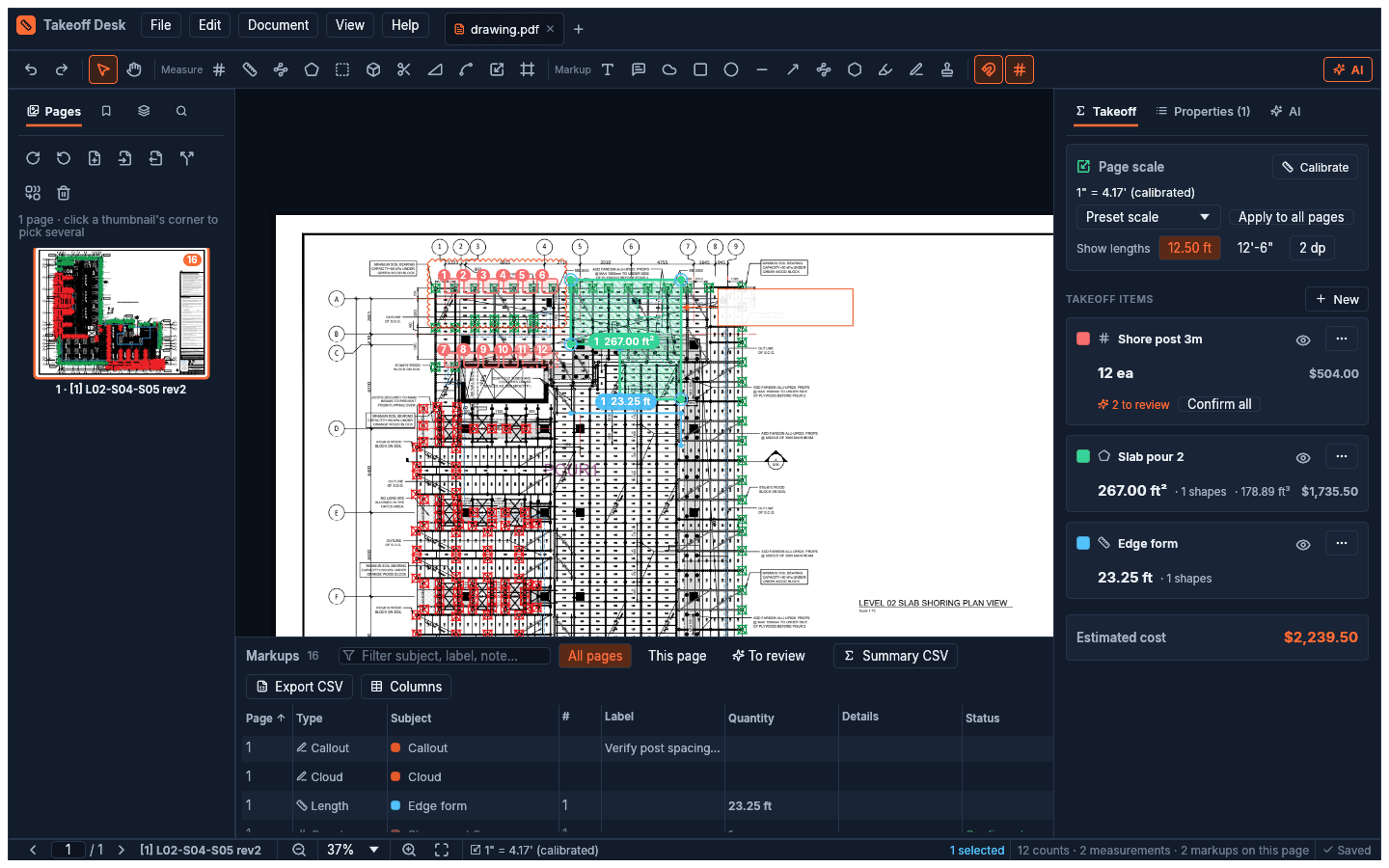
Takeoff Beam with a drawing sheet open, a takeoff in progress and the markups list below

construction.live Desktop

Stands in for ChatGPT, Copilot and a shared drive

Shipped

The full agentic workspace, with the model on your own disk.

A chat that answers from your project rather than from the internet, a drive, an estimation bench, voice input and a project wiki. The model ships with the app, so a question about a sealed bid never leaves the laptop.

  • Attach drawings, contracts, specs and correspondence. They are parsed on the machine.
  • An estimation bench and a project wiki, so the work compounds instead of resetting per chat.
  • Ships with Qwen3.8-4B quantised for a normal laptop. Point it at any other local model.
  • Switch to a cloud model on purpose, in the picker, and it tells you which one you are on.

Version 0.1.0 · Released 4 Sept 2026

Apple Silicon, macOS 12 or newer. Windows is being built.

The construction.live desktop app with a drawing open in the estimation workspace

Four more, in the order the paperwork arrives.

The ring is how far along each one is against the list on its card. An app gets a download button when it can stand in for the commercial tool on a real job, not before.

Drawing Checker

Stands in for A week of coordination review

In the open

Finds the conflicts in a drawing set before the site does.

Reads the architectural, structural and MEP sheets as one set and flags where they disagree: a beam through a duct run, a door that moved on A-201 but not on the schedule, a grid line that drifted between revisions.

  • Cross-discipline clash finding on 2D sheets, no model required.
  • Revision-to-revision diff that explains the change, not just the pixels.
  • Every finding links back to the exact spot on each sheet.

Contract Reviewer

Stands in for The first pass you pay a lawyer for

In the open

Reads a subcontract and tells you where it bites.

Pay-when-paid, no-damages-for-delay, flow-down clauses, indemnity that runs one way. It reads the contract on your machine, marks the clauses that shift risk to you and shows how they compare to a standard form.

  • Clause-by-clause risk flags with the plain-English reason.
  • Compare against AIA, ConsensusDocs or your own paper.
  • Nothing uploaded, which matters when the contract is the thing under NDA.

Schedule

Stands in for Primavera P6 and MS Project

In the open

CPM scheduling that a superintendent will actually open.

A Gantt with real critical-path logic, lookaheads, and a daily log that updates progress without a scheduler re-keying it. Reads and writes the file formats the GC already sends.

  • Critical path, float, constraints, calendars and baselines.
  • Three-week lookahead as a first-class view, not an export.
  • Imports XER and MPP, so the owner's schedule is a starting point, not a retype.

Office

Stands in for Word and Excel, for construction documents

In the open

Documents and sheets that know what an RFI, a submittal and a change order are.

A writer and a spreadsheet with construction templates built in, so a change order carries its backup, a daily report carries its weather and crew, and a letter cites the clause it is relying on.

  • RFIs, submittals, change orders, daily reports, meeting minutes, notices.
  • Opens and saves .docx and .xlsx, so nobody downstream has to install anything.
  • The same local model drafts, summarises and checks, on the machine.

Before you install anything.

A set of free desktop apps for the work a small or mid-sized contractor does every day: takeoff, drawing review, contracts, scheduling and documents. Each one runs entirely on your own computer and is built to replace the commercial tool it sits next to, not to be a lighter version of it.

The office is not finished. That is the point.

Install what is shipped, read what is being built, and tell us which tool your office would drop tomorrow. The order above is our best guess at where the pain is. You know better.